
Select
Enhance your React Native app with a customizable Select dropdown component. Supports accessibility, animations, and flexible styling for a smooth user experience. This is an illustration of Select component.variant
size
Installation
Run the following command:
npx gluestack-ui@latest add selectAPI Reference
To use this component in your project, include the following import statement in your file.import {
Select,
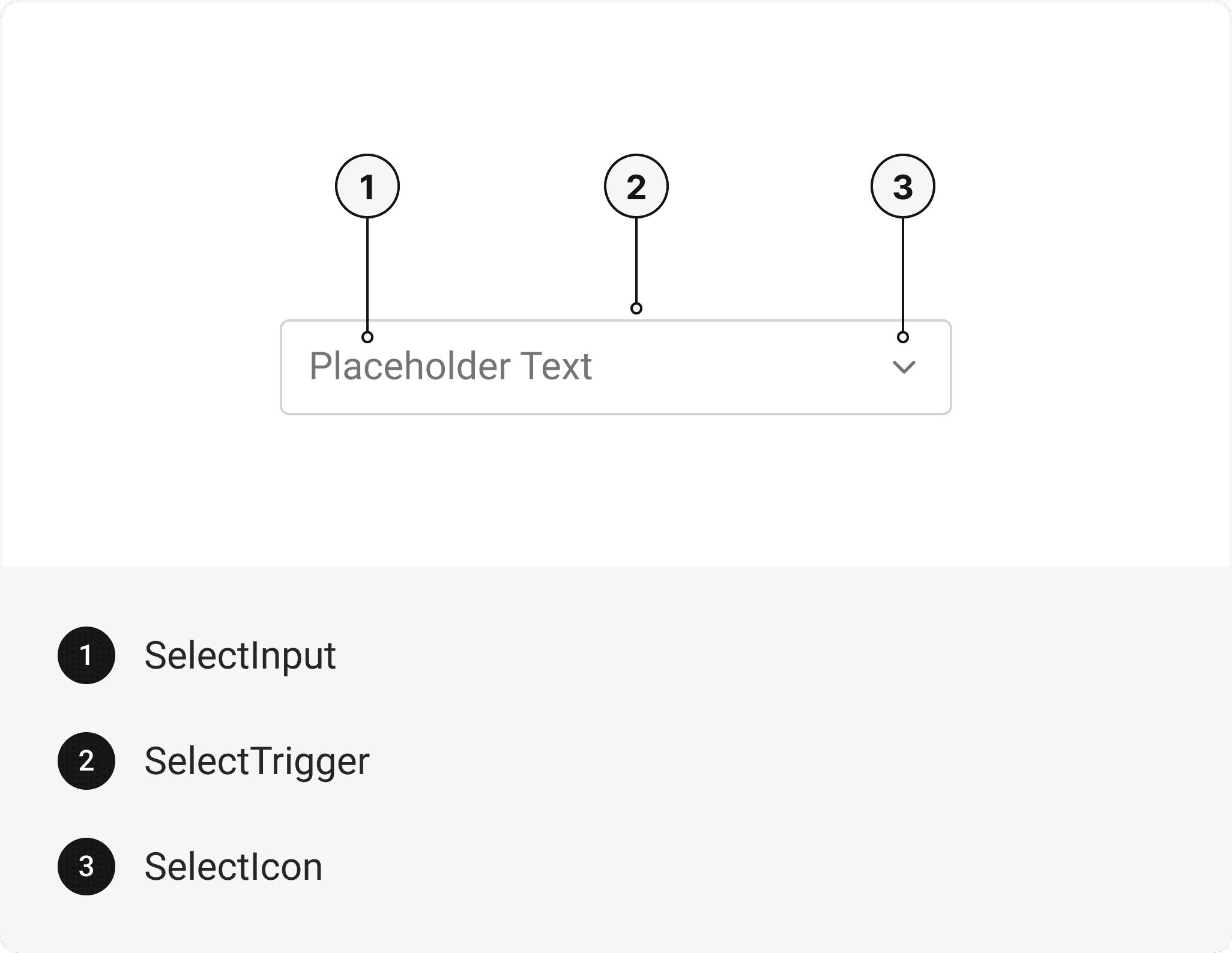
SelectTrigger,
SelectInput,
SelectIcon,
SelectPortal,
SelectBackdrop,
SelectContent,
SelectDragIndicatorWrapper,
SelectDragIndicator,
SelectItem,
} from '@/components/ui/select';
export default () => (
  <Select>
    <SelectTrigger>
      <SelectInput />
      <SelectIcon as={IconComponent} />
    </SelectTrigger>
    <SelectPortal>
      <SelectBackdrop />
      <SelectContent>
        <SelectDragIndicatorWrapper>
          <SelectDragIndicator />
        </SelectDragIndicatorWrapper>
        <SelectItem />
      </SelectContent>
    </SelectPortal>
  </Select>
);
Component Props
This section provides a comprehensive reference list for the component props, detailing descriptions, properties, types, and default behavior for easy project integration.Select
Contains all Select related layout style and high-level select props. It inherits all the properties of React Native'sView
component.
Important Note
Note: Please note that this select component renders as an Actionsheet on
iOS
and Android
devices for a native feel. On web
, it behaves like a regular select element and renders the default HTML options.
| Prop | Type | Default | Description |
|---|---|---|---|
isDisabled | boolean | false | When true, the select is disabled and cannot be edited. |
isInvalid | boolean | false | When true, the select displays an error state. |
isRequired | boolean | false | When true, sets aria-required="true" on the input. |
isHovered | boolean | false | When true, the select displays a hover state. |
isFocusVisible | boolean | false | When true, the focus ring of select will be visible. |
isFocused | boolean | false | When true, the select displays a focus state. |
closeOnOverlayClick | boolean | false | When true, the select will close when the overlay is clicked. |
selectedValue | string | - | Sets the currently selected option value, allowing the component to render with the corresponding option pre-selected. |
initialLabel | string | - | Sets the initial selected Label for a select component. |
defaultValue | string | - | Sets the initial selected option value for a select component. |
onOpen | () => any | - | Callback to be invoked when Select Dropdown or Actionsheet is opened. |
onValueChange | () => any | - | Callback to be invoked when Select value is changed. |
onClose | () => any | - | Callback to be invoked when Select Dropdown or Actionsheet is closed. |
Important Note
Note: Please note that if you want to use
initialLabel
prop, then you also need to pass defaultValue
or selectedValue
prop, to select the option value for a select component.
SelectTrigger
It inherits all the properties of React Native'sPressable
component.
SelectInput
It inherits all the properties of React Native'sTextInput
component.
SelectIcon
It inherits all the properties of React Native'sPressable
component.
SelectPortal
It is internally mapped wth gluestack-ui'sActionsheet
component, which inherits all the properties of React Native's View
component.
Important Note
Note: If snapPoints are not provided to
SelectPortal
, then it's essential to set maxHeight to SelectContent
.
SelectBackdrop
It is internally mapped wth gluestack-ui'sActionsheetBackdrop
component, which is React Native's Pressable
component, created using @legendapp/motion's
createMotionAnimatedComponent
function to add animation to the component. You can use any declarative animation library you prefer.
SelectContent
It is internally mapped wth gluestack-ui'sActionsheetContent
component, which inherits all the properties of @legendapp/motion's
Motion.View
component. With this ActionSheet component, you have the flexibility to use any declarative animation library that suits your needs.
SelectDragIndicatorWrapper
It is internally mapped wth gluestack-ui'sActionsheetDragIndicatorWrapper
component, which inherits all the properties of React Native's View
component.
SelectDragIndicator
It is internally mapped wth gluestack-ui'sActionsheetDragIndicator
component, which inherits all the properties of React Native's View
component.
SelectItem
It internally uses gluestack-ui'sActionsheetItem
and Actionsheet.ItemText
component, which inherits all the properties of React Native's Pressable
component.
| Prop | Type | Default | Description |
|---|---|---|---|
isDisabled | bool | false | When true, its disabled state activates. |
label | string | - | setting label that displays to the user. |
value | string | - | The value to be used for the item. This is the value that will be returned on form submission. |
textStyle | inherits all the properties of react native text | - | This prop only works on native. |
SelectScrollView
It is internally mapped wth gluestack-ui'sActionsheet.ScrollView
component, which inherits all the properties of React Native's ScrollView
component.
SelectVirtualizedList
It is internally mapped wth gluestack-ui'sActionsheet.VirtualizedList
component, which inherits all the properties of React Native's VirtualizedList
component.
SelectFlatList
It is internally mapped wth gluestack-ui'sActionsheet.FlatList
component, which inherits all the properties of React Native's FlatList
component.
SelectSectionList
It is internally mapped wth gluestack-ui'sActionsheet.SectionList
component, which inherits all the properties of React Native's SectionList
component.
SelectSectionHeaderText
It is internally mapped wth gluestack-ui'sActionsheet.SectionHeaderText
component, which inherits all the properties of React Native's Text
component.
Features
- Support for native and web platforms separately.
- Support for passing custom trigger.
Accessibility
We have outlined the various features that ensure the Select component is accessible to all users, including those with disabilities.These features help ensure that your application is inclusive and meets accessibility standards.Adheres to theWAI-ARIA design pattern
.
Keyboard
- Tab + Space: Triggers the select's action.
Screen Reader
- VoiceOver: When the select is focused, the screen reader will announce the select content.
Props
Select component is created using View component from react-native. It extends all the props supported byReact Native View
and the props mentioned below.
Select
| Name | Value | Default |
|---|---|---|
size | sm | md | lg | xl | md |
variant | underlined | outline | rounded | outline |
Data Attributes Table
Component receives states as props as boolean values, which are applied asdata-*
attributes. These attributes are then used to style the component via classNames, enabling state-based styling.
| State | Data Attribute | Values |
|---|---|---|
hover | data-hover | true | false |
disabled | data-disabled | true | false |
focus | data-focus | true | false |
invalid | data-invalid | true | false |
Examples
The Examples section provides visual representations of the different variants of the component, allowing you to quickly and easily determine which one best fits your needs. Simply copy the code and integrate it into your project.Select FormControlled
The Select component with FormControl example demonstrates how to manage its state using the FormControl component. This allows for easy integration with forms and form validation.Edit this page on GitHub